Manage Real Shop Operations From One Dashboard
ShopBoard is the workflow platform for restoration, fabrication, upholstery, and custom shops. Boards, item tracking, time, appointments, and customer updates — all in one place.
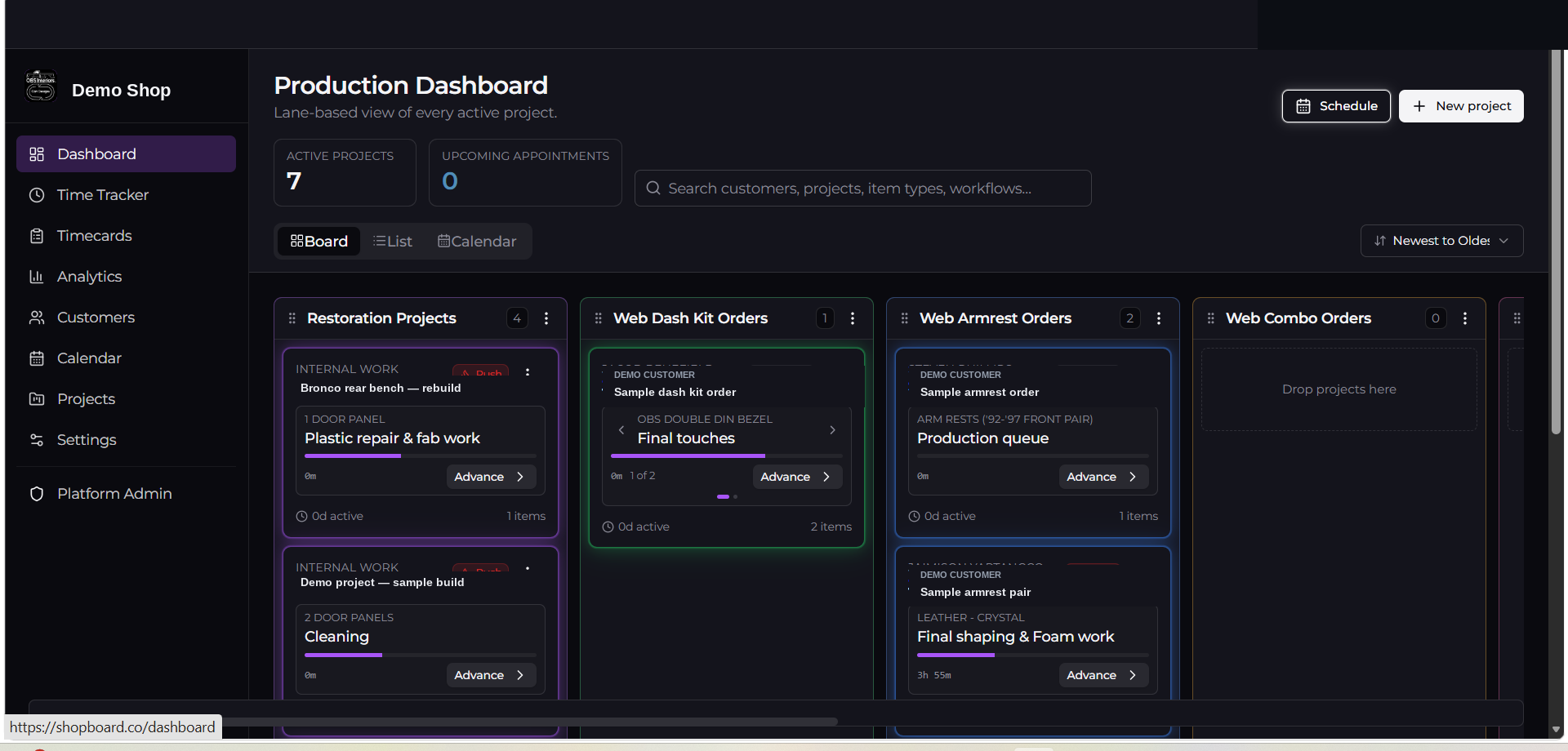
Every panel, part, and cushion has its own workflow.
Projects aren't single tasks — they're 20 little jobs in a trench coat. ShopBoard tracks each item inside a project through its own stages so nothing slips between the table saw and the finish room.
- Per-item stages with progress
- Roll-up status at the project level
- Built around real shop sub-assemblies
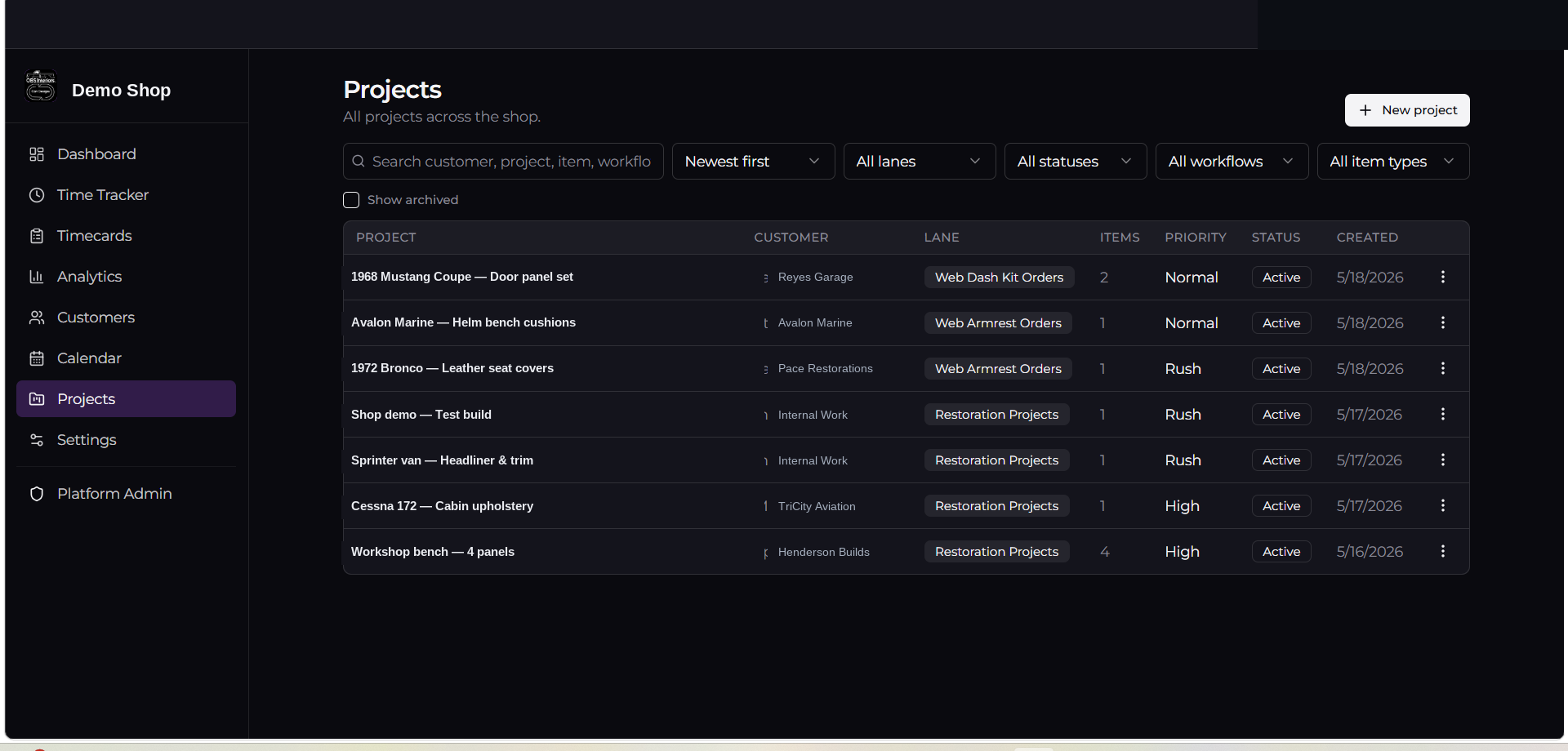
Clock in by customer, project, item, and stage.
Stop reconstructing the week from memory. Crew clocks against the actual work — by job, by item, by stage — and timecards roll up clean for invoicing and payroll.
- Live station-based clock in / clock out
- Switch jobs without losing context
- Day, employee, and job roll-ups
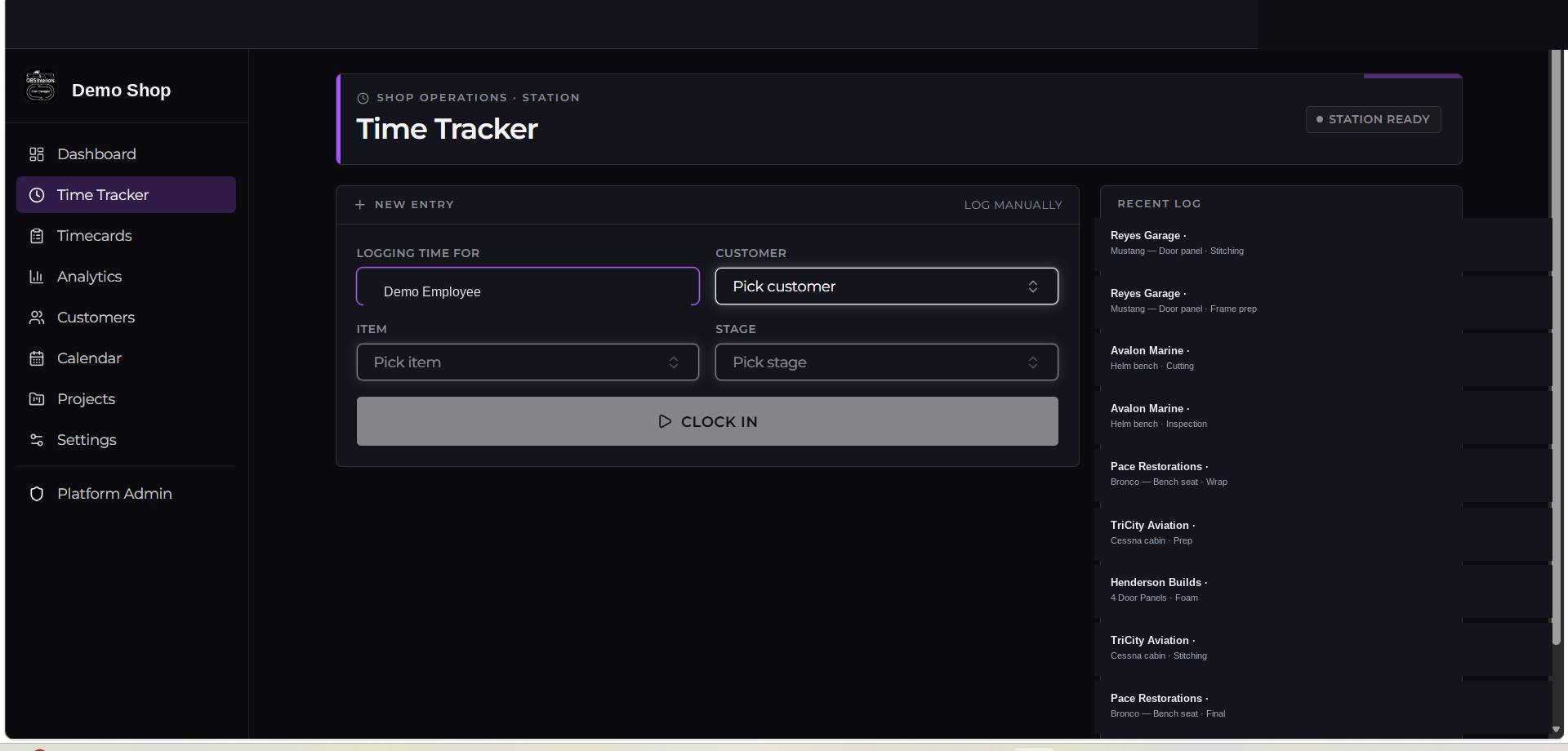
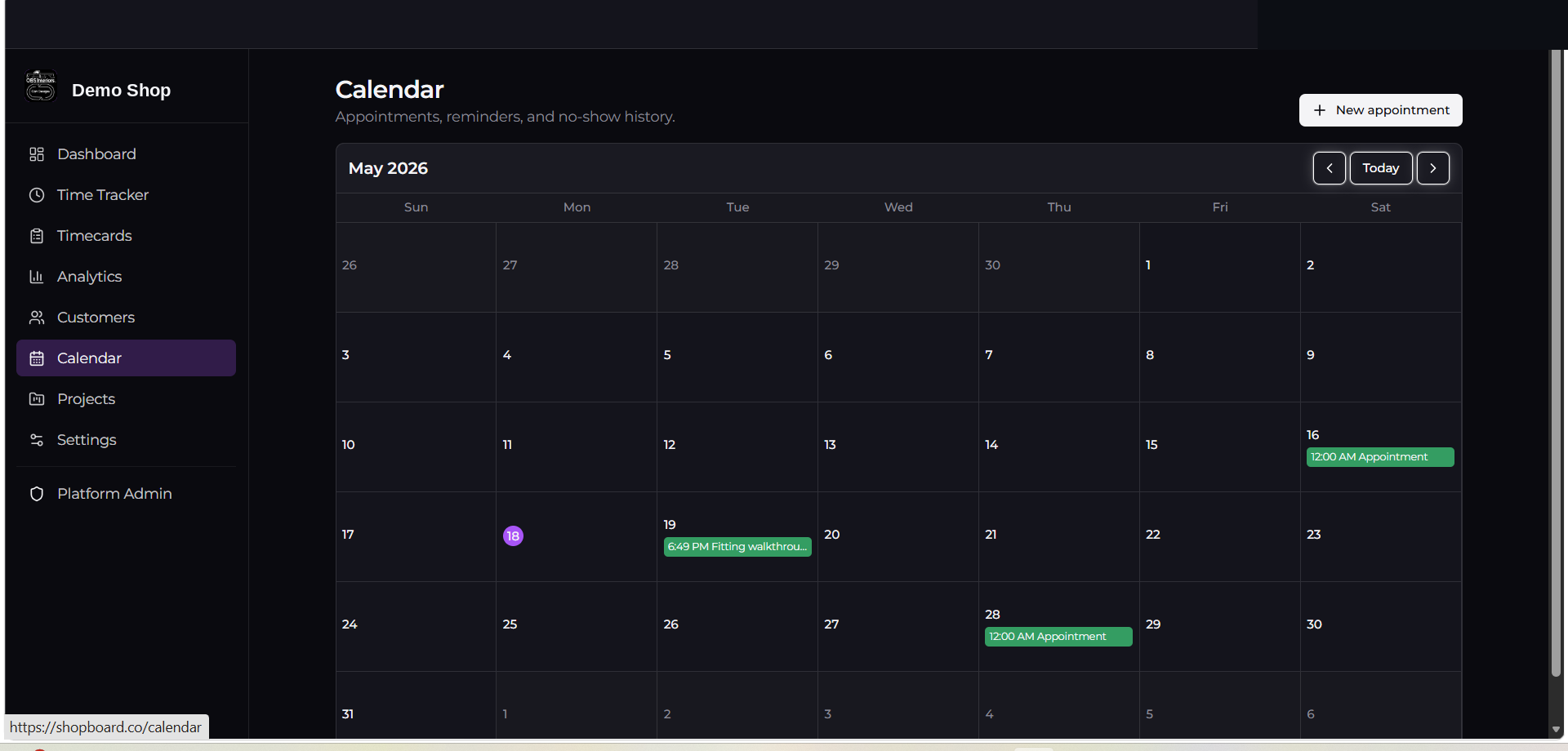
Drop-offs, installs, and shop days in one calendar.
See the week the shop is actually committing to. Appointments are operationally connected to projects — convert them into active production with one click, or mark them as a cancellation or no-show when plans change. Scheduling flows straight into the production board without copy-paste or double entry.
- Color-coded shop, install, and pickup days
- Convert an appointment into an active project with one click
- Mark cancellations and no-shows without losing the record
- Customer info carries through automatically
Real shop history, turned into a reference for the next job.
Most shops estimate from memory and gut feel. ShopBoard quietly records how long each workflow actually takes. After an item runs through the same workflow a handful of times, you stop guessing — you have a real reference built from your own floor.
- Average completion time per workflow, built from completed runs
- Fastest recorded run — best-case pace when everything cooperates
- Longest recorded run — what to brace for when it doesn't
- Use real production data to quote, schedule, and plan the next one
Keep customers informed — without exposing internal operations.
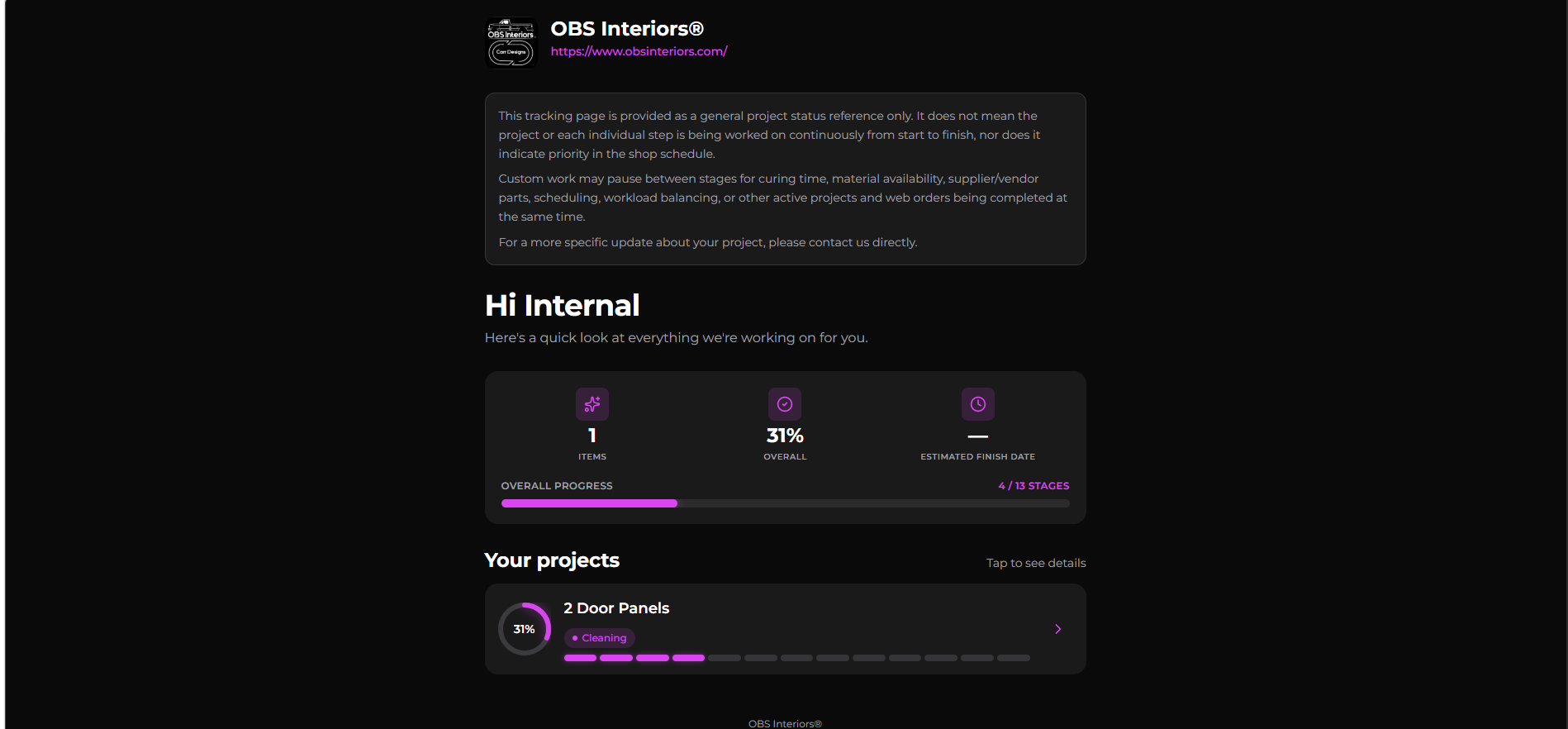
Every project gets a clean, branded status page on your own link. Customers see workflow progress and current stage. They don't see scheduling, internal notes, pricing, other jobs, or how the shop floor is actually being run that week.
- Per-project shareable link with your shop's branding
- Shows current stage, workflow progress, and item count
- Hides scheduling, internal notes, pricing, and other customers
- Includes a clear note that progress reflects status, not active priority
Designed for hands on tools, not on keyboards.
Most shop owners and crew aren't sitting at a desk. ShopBoard works on a phone in your back pocket — clock in between cuts, snap a progress photo, advance a stage from the bench.
- Big-target clock in / clock out
- Quick stage advances from the job card
- Photo notes attach straight to the item
The rest of the things a real shop needs.
Customizable production lanes
Organize the dashboard into the lanes your shop actually runs — by category, item type, or workflow. Visual production flow at a glance, instead of digging through one giant project list.
Custom workflows
Define the stages your shop actually uses. Different workflows for different item types.
Timecards & CSV export
Roll-ups by employee, day, and job. Lightweight CSV export for payroll workflows, records, or outside systems.
Historical workflow timing
Completed runs build a reference library — averages, fastest, longest — so estimates and schedules stop being guesses.
Appointments & calendar
Drop-offs, installs, and shop days. Convert an appointment into an active project, or mark it as a cancellation or no-show — scheduling stays connected to production.
Customer tracking links
Per-project status pages with your branding — not a generic SaaS page.
Team member access
Owners control settings and pricing. Team members do the work without seeing what they shouldn't.
Theme personalization
Dark or light mode and a handful of accent palettes. Personalize the look without breaking the workflow structure.
Optional supply tracking
Turn on lightweight supply and material usage tracking when you want visibility into what got used on a job — without the weight of full inventory or accounting software.
Email templates
Confirmations, status updates, reminders — sent from your shop, not from us.
Workspace isolation
Your customers, projects, and photos are yours. Nobody else's workspace can see them.
ShopBoard wasn't built in a conference room.
It was built inside an actual restoration and custom interior shop — OBS Interiors — to solve problems that off-the-shelf project tools couldn't. Spreadsheets, sticky notes, a whiteboard, a group text thread. None of it scaled past three active jobs.
Every feature exists because something on the floor was breaking without it. Item-level tracking, per-job clocks, customer status links, workflow stages that actually match how shops work. No buzzwords. No SaaS theater. Just the platform we wanted to use.
One operator or a full crew — same platform.
Whether you're a one-person operation or a growing custom shop with specialized team roles, ShopBoard is designed to scale alongside your workflow, team size, and business — while helping keep projects, scheduling, and production visibility organized in one place.
- Solo operators running every stage themselves
- Growing teams splitting work across the bench
- Specialized shop roles — build, finish, install, office
- Layered workflows for different item types
- Expanding operations adding stations and crew
- Owners keeping production visibility in one place
Keep it light. Or expand it as the shop grows.
Operational systems aren't one-size-fits-all. ShopBoard keeps the core workflow enabled by default, and a handful of optional systems you can switch on from settings when your workflow, team, or operation actually needs them. Nothing extra cluttering the floor view until you decide it belongs there.
Optional supply & material usage tracking
Record what was used on a project — for operational visibility, not warehouse accounting. Off by default. Turn it on when the shop wants to see real material usage per job.
Secondary lanes
Some projects belong in more than one operational queue at the same time — a restoration also waiting on billet parts, a dash kit also sitting in the outsourced paint queue, a build that needs to show up in production and the machine shop list at once. Secondary lanes let one project appear in multiple lanes without duplicating the record, so overlapping work stays organized and in sync. Off by default for shops that run a single lane structure.
Advanced analytics & historical timing
Workflow averages, fastest and longest runs, and per-stage timing build quietly in the background. Use them when you're ready to quote and schedule from real data instead of memory.
Operational tracking depth
Per-item stages, station-based clock in, photo notes, and optional customer-facing tracking links. Run the basics or layer in the detail — same platform, same workspace, same data.
Every optional system is a workspace setting — flip it on when you need it, flip it off when you don't. Technicians on the floor only see what's actually in use, which keeps the platform fast, uncluttered, and easy to learn on day one.
The goal is a workspace that scales with the shop — light enough for a one-person operation, deep enough for a full team — without forcing extra systems on anyone who doesn't need them.
ShopBoard is project management, production tracking, and operational visibility for custom shops. Progress at a glance, tracked labor, material usage where it matters, and optional customer-facing tracking links so customers can follow along when the shop wants them to. It's not accounting software, not warehouse inventory, and not a bloated enterprise ERP — just the operational information a custom shop actually works from day to day.
Ready to Bring ShopBoard into your shop?
Begin creating your workspace in under a minute.
Public beta is open and currently free. Early shops help shape workflow improvements and platform direction through real-world usage and feedback.